Building Generative Adversarial Networks In Tensorflow and Keras
I wrote a little demo of how to make a gif in Colab. You can check it out below or you can open it and run it yourself by clicking on the “Open in Colab” button at the top.
NeurIPS
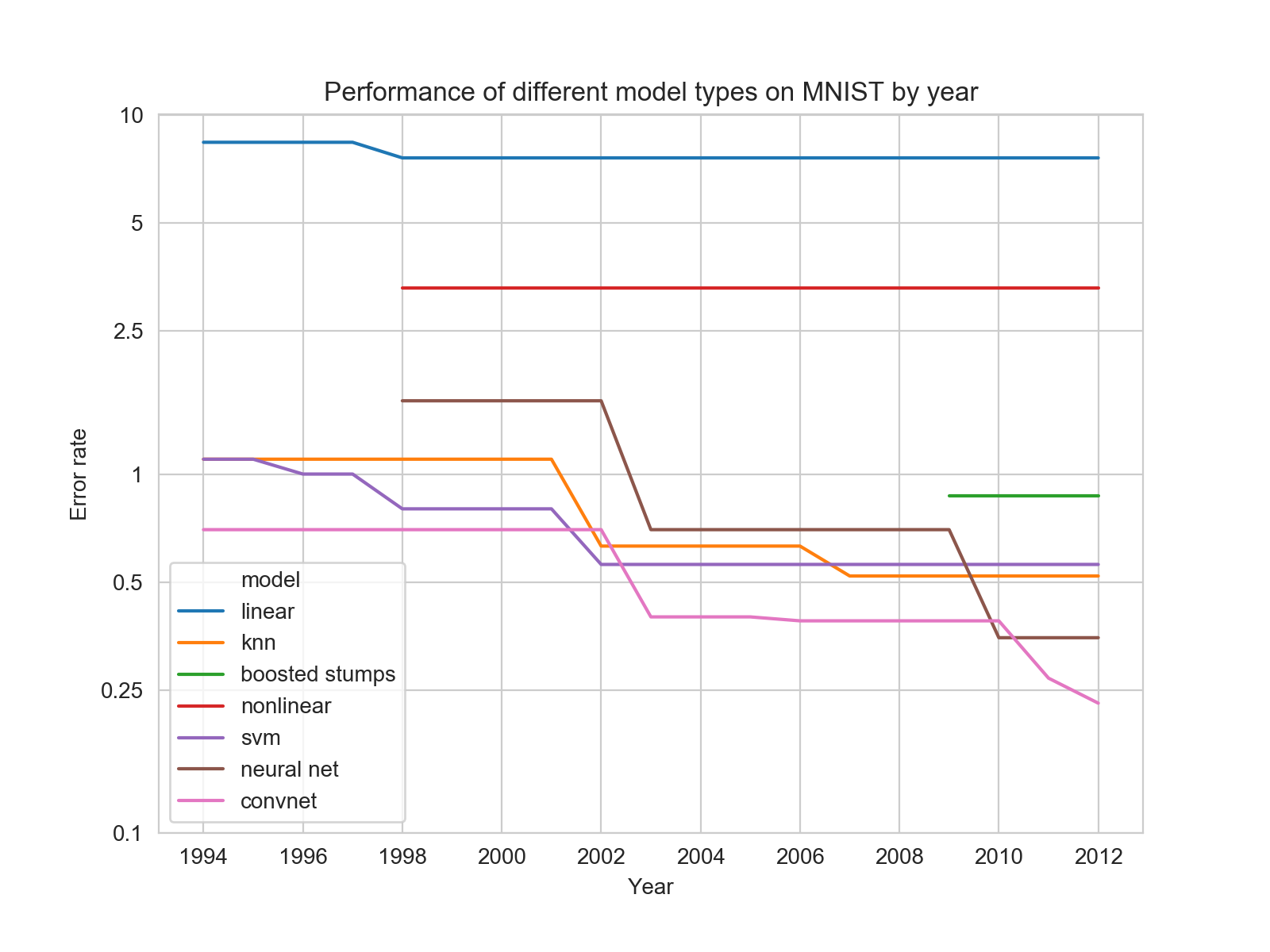
Today I was trying to answer the question of why it seems like so much attention was given to support vector machines in the past. I had assumed that before the Deep Learning renaissance in 2006, SVMs were the dominate model because they outperformed Deep Learning models of the time. But if that was true, I wanted to see how it changed over time and how SVMs and DL models compared to less practical models like KNN.
To investigate this, I went to a table of top performances on the MNIST dataset maintained by Yann LeCun. This table is helpfully organized by model type and year.
I made a bunch of hand modifications (which you can find here) to allow me to plot the performance of different model types. To my surprise, SVMs were actually never the dominant. The reasons SVMs were favored over Deep Learning turn out to be much more subtle and I’ll save them for later.
In early 2015, Apple debuted their butterfly keyboard on their new “macbook”. Since then Apple has migrated this “feature” to their macbook pro line while several have voiced loud complaints about the shallow, fragile keyboard. Apple has since admitted that there’s a problem and offered to repair keyboards with sticky or unresponsive keys.
But turning your computer in for a repair is tedious and likely requires parting with your computer for a week or more. Also, perhaps you are like me and have already extensively repaired your unrepairable computer and violated the warranty in a number of ways. In these cases, it might make more sense to repair your keyboard on your own.
I’ve been using this dumb keyboard for 3.5 years now (what can I say, I love the romance of having the smallest possible computer that can do the things I need). I’ve cleaned these keys more times than I can count and I’ll document my process here. I know this process works for gen 1 and gen 2 of the butterfly keyboard and I’m guessing it works for the rest.
 The back of the 'U' key cap and butterfly switch. I've marked the 4 points where the key cap connects to the switch. Sorry my potato phone stinks at macros!
Before you do anything, make sure you understand how the key cap and switch connect to each other. The key cap is what I’m calling the black piece with the key printed on int. The switch is what I’m calling the gray-white mechanism inside the keycap that flaps its wings like a butterfly.
There are four points that connect the key cap and switch: two clips on the top and two hooks on the bottom.
When removing the key cap from the keyboard, it is very important that you only lift from the top, where the clips are. The hooks should only be disconnected after the clips have. If you get this wrong, you can break the hooks on the bottom of the key cap or the pins on the bottom of the switch. Trust me, I’ve done this!
Now, first thing you’ll do is insert one of the corners of your key cap removal tool (metrocard) under the top of the key and pry it up. (video of this below) Sometimes you’ll get both the key cap and switch together, sometimes the key cap will come loose first. The switch is held in by four little pins on the inner rim and you can easily remove it with a fingernail or your key cap removal tool.
Remove whatever it is you got under there. It can be really small! Take your time here. I’ve typically used a damp cloth to do this but I also have a high tolerance for risk so you do you.
For this step, a similar word of caution to step 1. It is very important that you don’t squish the hooks in the key cap onto the pins of the switch
I have a video of these steps below.

Nix (Sophie) Searcy is a Data Scientist at Metis where she’s a bootcamp instructor and leads curriculum development. Nix works in deep learning and AI ethics. Through t4tech Nix helps provide free trans-centered classes in programming and data science. Her writing has appeared in them. and Information Week.